HR data governance: a practical framework for people teams
.png)
.jpg)
Every audit, compliance check, or board request for workforce insights comes down to one question: can you find what you need, prove where it came from, and show you handled it correctly?
For many HR teams, the answer is "eventually, after three days of tracking down files."
The real cost isn't just the time. When you can't quickly produce clean data or answer strategic questions with confidence, you end up sinking time into administrative tasks instead of working on career-defining initiatives workforce planning, compensation strategy, and organizational design.
This guide walks you through a practical operating model for HR data governance. You'll get a five-step control loop (catalog, classify, control, check, change), and a simple rollout plan you can complete in 90 days.
By putting these recommendations into practice, you’ll be able to reduce compliance risk while enabling the workforce planning and strategic analysis that positions HR as a true business partner.
📊 Centralize your people data with confidence
Leapsome's connected HRIS brings reviews, surveys, goals, and compensation into one system so you can catalog once and govern everywhere.
👉 Explore Leapsome HRIS
The hidden cost of fragmented HR data and unclear decision rights
A manager exports performance ratings and accidentally shares them department-wide. An HR analyst sends compensation data to their personal email. Someone runs a "quick report," and now three versions are floating around with different dates.
These scenarios can easily occur, but they carry great risk in terms of inefficiencies and compliance. Managing these data governance risks is a critical part of broader HR risk management, where unclear ownership and fragmented systems create exposure across multiple areas.
HR data governance is the set of policies, processes, and controls you implement to mitigate these risks. They determine who can access workforce data, how long you keep it, and how you prove you're handling it correctly.
The three failure patterns that drive risk and cost
Most governance breakdowns we've observed follow three patterns:
- Access sprawl — for example, someone gets view access for a project, then edit, then export. Six months later, they still have all three permissions, and nobody remembers why.
- Uncontrolled retention — this means keeping data "in case we need it" without a business or legal reason. When someone exercises their right to erasure, you can't say which systems have their data.
- Unverifiable audit trails — if you're exporting logs from four systems and hoping you didn't miss anything, you'll struggle to quickly produce evidence when you need it.
Our five-step governance loop, which we examine next, addresses these risks to HR data security and privacy by integrating decisions into everyday workflows.
How to operationalize HR data governance with the five-step loop
Most governance frameworks we've reviewed aren’t practical for HR teams trying to ship a review cycle on time. Our five-step governance loop takes a different approach by connecting directly to workflows you're already running, such as performance reviews, engagement surveys, goal cycles, and compensation planning.
The loop works in five stages:
- Catalog your datasets and assign owners
- Classify them by sensitivity
- Control who can access what
- Check that the controls are working
- Change what's broken
Each step ties to a real HR workflow, so governance becomes part of how you work rather than something separate you do for compliance. Below, we look at each one.
1. Catalog: make a living inventory that names owners and data sources
Think of your catalog as the source of truth for where data lives, who can touch it, and why you're allowed to have it.
This can be a spreadsheet, a section in your HRIS documentation, or a feature in your data governance tool (whatever works for your team to maintain and actually reference).
For each dataset, document the following:
- System and dataset name
- Business purpose and lawful basis (contract, legal obligation, legitimate interest)
- Data owner
- Retention period
- Evidence source
This prevents the "who owns this?" confusion that stalls decisions. By cataloging new datasets as they're created (so, before the first record is collected), you avoid the scramble when someone asks, "Where do we store performance ratings and who approved access for the compensation framework?"
For example, if you want to create a new quarterly review cycle, add a line to the catalog with the owner and classification assigned by the person who requested it.
2. Classify: apply sensitivity levels that reflect real HR risks
Classification, which also needs to be cataloged along with the fields listed above, determines who needs to see what and how carefully you protect it.
A typical four-tier approach might look something like this:
- Restricted — medical leave notes, disability accommodations, performance improvement plans, salary negotiation comments
- Confidential — performance ratings and manager comments, survey verbatims, compensation bands, demographic data for diversity reporting
- Internal — aggregated performance distributions, department org charts, training records, goal progress summaries
- Public — job titles, office locations, published bios
Therefore, as part of your process for case management, if an employee requests a medical accommodation through your system, that request defaults to ‘Restricted’ with access limited to the assigned HR case manager. This ensures it’s not visible to the employee's direct manager unless explicitly granted on a case-by-case basis.
3. Control: set smart access rules that protect data without slowing teams down
Access control can sound bureaucratic until you realize how much easier it makes shipping a review cycle or closing compensation planning on time.
Design roles around workflows. Managers running reviews need view and edit access to their direct reports' data, but they don't require the ability to export a file containing the performance ratings of 500 employees.
Likewise, HR business partners typically need view access across multiple departments to support their stakeholders, but bulk exports (downloading more than 50 records at once) should require a time-bound approval, like "approved for this compensation cycle, expires in 30 days."
A good way to ensure permissions stay current is to run quarterly access reviews where each owner confirms their team's permissions. As you do this, automate where possible: flag dormant accounts, expire temp access, and log high-risk actions.
You can also set up break-glass access, which is a controlled override for urgent situations.
For example, imagine an executive needs employee data for an urgent board request. They can request emergency access that's granted immediately but flagged for post-approval within two business days.
4. Check: monitor, review, and evidence in under 48 hours
Checking moves governance from HR policy management to organization-wide practice. You need a rhythm that catches problems before they become incidents, utilizing monthly anomaly reviews, quarterly role confirmations, spot-checks for deletions, and a 48-hour evidence SLA.
- Monthly anomaly reviews look for unusual activity like bulk exports during off-hours, access spikes to restricted datasets, or permission changes without approval tickets. This takes about 30 minutes if you've instrumented logging correctly. For example, your HRIS flags when someone downloads more than 100 records outside business hours.
- Quarterly role confirmations ask each data owner to verify their team's access is still appropriate via a simple yes/no form with a free-text field for exceptions.
- Deletion sampling means once a month, you pull ten records per dataset that hit their retention trigger and verify they were actually deleted. Then you document the spot-check results.
- Evidence SLA means committing to produce audit evidence (who accessed what, when, and why) within 48 hours of request. If you can't hit that target, your logging or catalog will probably need to be simplified.
When privacy and security teams use the same log sources and review cadence, you avoid duplicate work and catch gaps faster.
5. Change: fix defects fast and close the loop with clear comms
Change management helps ensure that your governance processes are sustainable in practice. When people see you actually fix things and explain what changed, they trust the system enough to report the next problem instead of working around it.
To do this, run a simple triage so that defects get assigned to a data owner within 24 hours, owners commit to fixing them within one sprint (typically two weeks), and HR publishes a quarterly change log explaining what happened. Each fix gets three sentences: what we found, what we changed, and why it matters.
For example, imagine you find that survey verbatims from Q2 were classified as Internal instead of Confidential. In this case, you’d reclassify them and update the survey template library so new feedback fields default to Confidential.
This reduces the re-identification risk and aligns your HR compliance processes with ICO guidance on qualitative data and the FTC on data security.
Build a retention and disposal policy that stands up in audits
We covered retention briefly when cataloging datasets, but this policy will need careful structuring to actually work in practice.
After all, you can't keep data forever "just in case," but neither can you delete records you're legally required to hold. Yet, being able to manage this consistently across potentially hundreds or thousands of datasets presents an obvious challenge.
Therefore, your policy needs five elements working together:
- Purpose-linked retention periods
- Disposal triggers
- Disposal method (delete vs anonymize)
- Exception path (how you extend retention when justified)
- Evidence location (where logs and policies live)
Data protection regulations like the GDPR's storage limitation principle in the UK and similar frameworks in other jurisdictions require keeping personal data only as long as necessary for stated purposes, with documented periods and regular reviews. The specific timelines vary by location and industry, but the core principle stays consistent.
The "beyond use" principle is a useful guide here. If you're not actively using the data and you don't have a legal obligation to keep it, you're probably holding it too long.
👀 Example: common retention periods
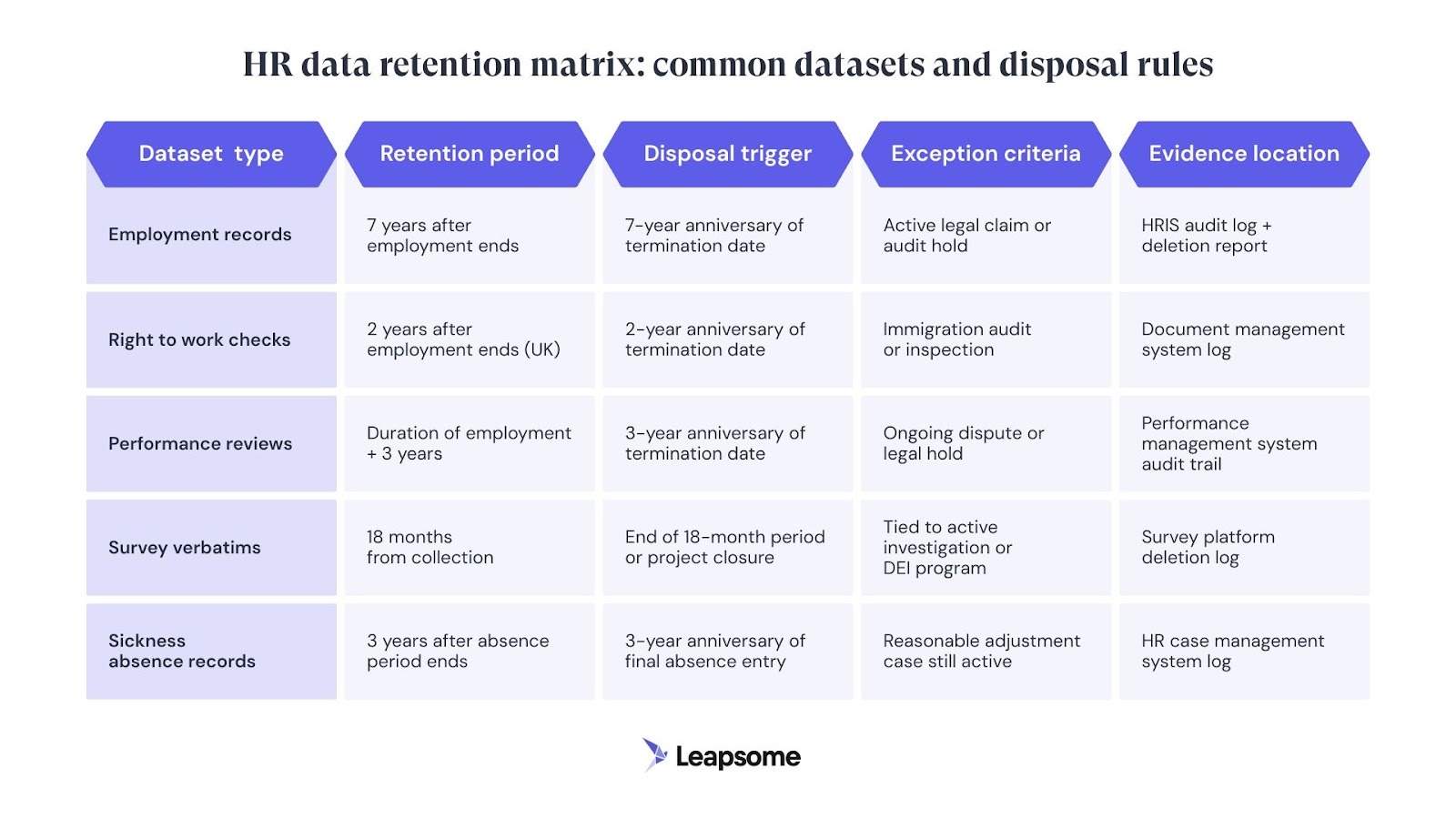
Employment records —seven years after employment ends (covering potential tribunal claims plus tax/audit requirements).
Right to work checks — two years after employment ends (though this varies by jurisdiction. For example, the UK requires two years).
Performance reviews — for the duration of employment plus a reasonable period (e.g., three years) to defend potential claims.
Survey data — only retained while it’s actively being used for decision-making or reporting.
Note: Always verify your retention periods against your local employment law and industry requirements.
Enforce policy with monthly reviews
The retention table below illustrates how these decisions align with common HR datasets. You can use it as a starting point and adapt it to your jurisdiction and business needs alongside a monthly review with legal.
This will help you catch data retention issues before they become audit problems, such as datasets that reach their disposal trigger but never get deleted, or exceptions that were approved "temporarily" two years ago.
Ship a 90-day rollout without breaking day-to-day workflows
You can't pause reviews or surveys for three months while you "get governance right," so use a phased rollout that ships quick wins and layers in controls to prove if the system works.
Here’s a simple setup you can implement:
- Phase 1: Quick wins (Weeks 1-3) — Assign owners to your top ten datasets. Catalog them with minimum fields. Reach 50% classification coverage by labeling high-risk fields first. Freeze high-risk exports pending approval.
- Phase 2: Controls live (Weeks 4-8) — Implement need-to-know access roles. Run first org-wide access review with 90%+ completion. Set retention rules for two priority datasets. Share your process for making a data request.
- Phase 3: Assurance (Weeks 9-12) — Turn on automated logs and monthly reviews. Hit 70%+ classification coverage. Prove you can deliver audit evidence in less than 48 hours. Share your process for urgent requests so people know how to get access quickly without working around the policy.
🔐 Make governance part of your workflow
When reviews, surveys, and goals share one data model, you're classifying and permissioning once instead of managing access across three tools.
👉 See how our HRIS works
Tie governance maturity to outcomes that leadership actually cares about
Governance for its own sake is often a hard sell, but we've seen that when HR teams demonstrate how it reduces risk, speeds up decisions, and enables better planning, they receive budget and attention.
Moreover, a justified and structured approach to data governance positions HR as a strategic partner, rather than a purely administrative function. In turn, this gives people teams greater influence over issues like workforce planning, compensation strategy, and organizational design.
Therefore, framing your metrics in business language can have a significant impact on key stakeholders.
“When you can confidently report workforce metrics to the board because you know exactly where the data originated and who validated it, you're laying the foundation for HR to have a genuine impact on business-wide strategic planning.” - Jenny Podewils, Leapsome CEO
Instead of saying "we hit 90% classification coverage," try "we can now produce audit evidence in two hours instead of two days, which means Legal doesn't get overwhelmed every time there's a regulatory inquiry."
Instead of saying "we implemented need-to-know access," consider stating, "managers can run performance reviews and compensation cycles without waiting for ad-hoc permissions, and we've cut access-related support tickets by 60%."
When you can confidently report workforce metrics to the board because you know exactly where the data originated and who validated it, you're laying the foundation for HR to have a genuine impact on business-wide strategic planning.
🎯 Turn clean data into strategic influence
Leapsome helps HR teams automate evidence collection, reduce manual exports, and answer board-level questions with confidence.
👉 Book a demo
FAQs about hr data governance
How does an HR data governance framework define roles and accountability across HR, IT, and Legal?
A good framework uses explicit roles: data owners (HR leads accountable for business decisions), data stewards (HRIS admins or People Analytics handling day-to-day custodianship), and data custodians (IT managing infrastructure, Legal advising on compliance).
Decision rights are key. Owners approve classification and retention rules, stewards implement controls and run reviews, and custodians maintain logs and enforce technical safeguards. When roles overlap, document who approves what to prevent bottlenecks.
How to implement data classification and access control in an HRIS without over-permissioning?
Start with three or four classification tiers (Restricted, Confidential, Internal, Public) and map your highest-risk fields first: health data, performance ratings, compensation details, survey verbatims.
Design access roles by workflow, not hierarchy, use field-level controls where possible, and run quarterly access reviews. Automate flags for dormant accounts and log all high-risk actions.
What metrics and KPIs should an HR data governance committee track each month?
Focus on metrics that drive decisions: datasets with assigned owners (target 100%), classification coverage (target 70% initially, 90%+ ongoing), quarterly access review completion (target 90%), time to produce audit evidence (target under 48 hours), and defect backlog age (nothing over 30 days).
Connect metrics to action so that if anomalies spike, you know to tighten export controls, and if classification experiences inconsistencies, you know to escalate the matter to managers.
Sam Abrahams


.jpg)
.jpg)

.jpg)