How to choose the right HR and HRIS software: A guide for growing teams
.png)

SHRM research shows that automated workflows and AI save time and improve efficiency for 85% of organizations that use them. Yet, less than a quarter of companies take advantage of these technologies to improve HR workflows.* These features are readily available in the best modern HRIS platforms, which means most companies are leaving valuable opportunities on the table.
This guide explains how to choose HRIS software that fits your situation, while respecting the constraints of running a small business. It also explores alternatives like HRMS and HCM software that might be a better match.
*SHRM, 2022
Why choosing the right HR software requires more than a features checklist
Picking an HRIS by just comparing features misses the forest for the trees. A complete HRIS selection checklist should account for issues that won’t show up in a side-by-side comparison, such as expensive implementation or hidden integration and support costs.
It’s also important to consider the user experience. Our 2024 report found that 65% of HR leaders say their current software isn’t user-friendly, and this forces team members to waste time grappling with difficult interfaces.
What are the best HR systems for small businesses?
HRIS platforms may be the most familiar option, but they’re not the only type of HR software. Most teams end up choosing one of these platforms:
- Human resources information system (HRIS): An HRIS manages employee records and core HR processes like payroll and time tracking. This is a lean option that can work well for organizations of all sizes.
- Human resources management system (HRMS): HRMS software typically comes with more robust automation and data centralization tools. That makes it a good choice for scaling organizations with growing requirements.
- Human capital management (HCM) software HCM platforms combine the features of HRIS and HRMS software with strategic workforce management driven by advanced analytics. Their scope and complexity make HCM software ideal for large enterprises and globally distributed teams.
Six core capabilities to evaluate in modern HR software
To gauge how well candidate solutions suit your organization’s needs, compare them across these six categories.
.jpeg)
1. Built-in AI and automation
“AI and automation aren’t replacing HR — they’re empowering it. By embracing these technologies to handle routine tasks, HR professionals can focus on what truly matters: strategy, employee experience, and driving organizational change. The ROI isn’t just financial; it’s reflected in increased employee potential.”
– Marie Richter, Fractional Chief People Officer and HR Consultant
Over 70% of HR leaders say they need more technical and people-centric skills than in the recent past. If your team struggles to keep up, automated workflows can help. Putting your most time-consuming manual tasks on rails, such as processing payroll, managing employee data, and gathering feedback, frees HR to focus on strategy instead of spreadsheets. This is where Leapsome comes in.
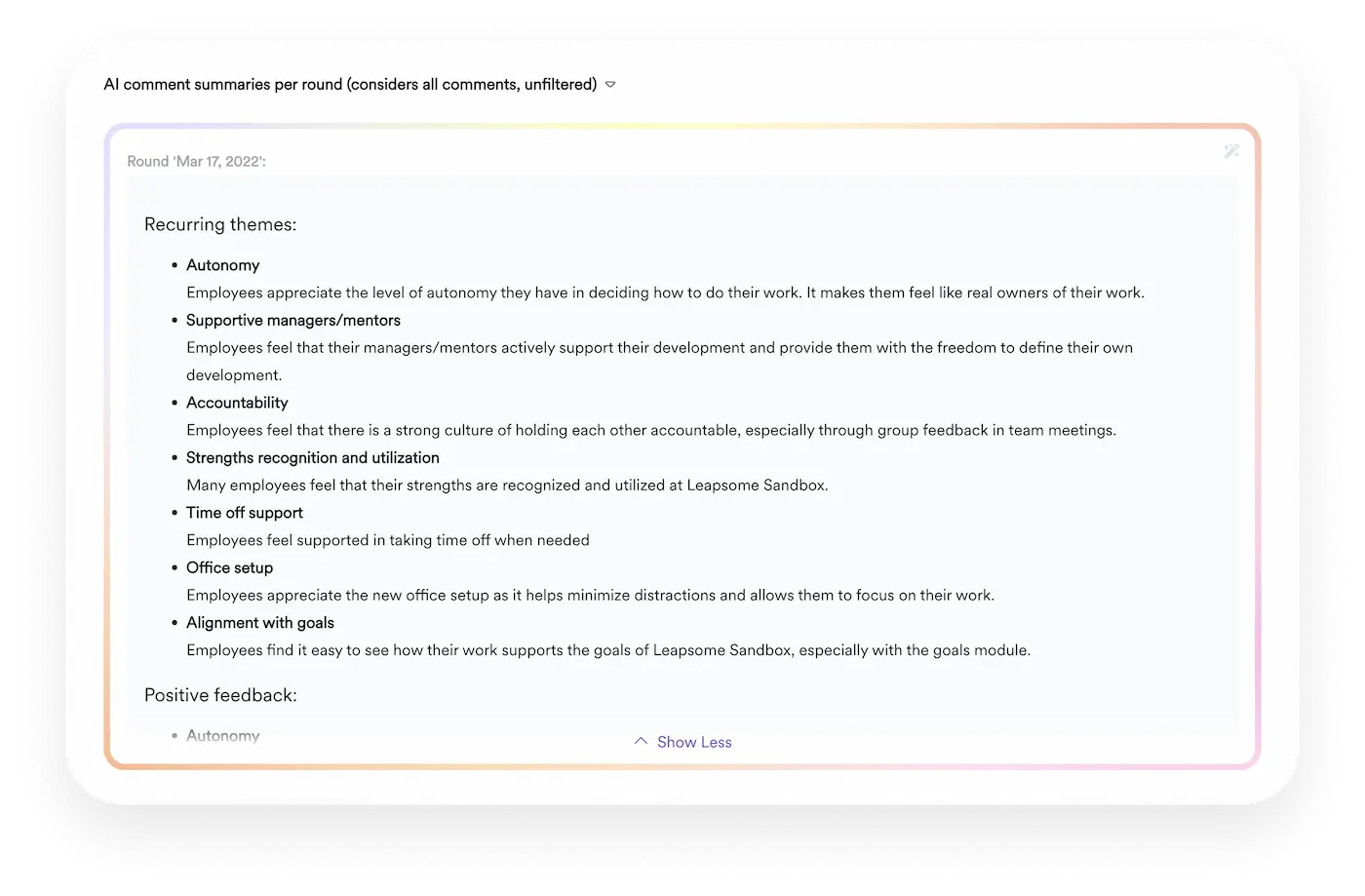
❓ Supercharge your survey process
Easily collect meaningful feedback, then let Leapsome’s expert AI analyze sentiment and generate actionable insights.
👉 Explore Engagement Surveys
2. Integrated HR and people enablement
All-in-one platforms that combine core HR functions with workforce management and employee engagement tools mean you don’t have to deal with an unwieldy tech stack. All your core systems talk to each other, which reduces manual data entry and allows for real-time visibility and reporting across domains.
3. Robust HR reporting
The best modern HR software helps leaders make high-stakes decisions based on hard data, instead of assumptions. Real-time reporting joins forces with advanced analytics to let teams predict trends and measure the success of past decisions.
4. Employee self-service
Self-service portals create a better employee experience by cutting out the middleman. If a team member needs to update sensitive information or request PTO, for instance, they don’t have to track down HR to do it.
“HR technology should enhance efficiency and deliver tangible value to the organization and its people — otherwise, employees won’t use it.”
– Polina Skliar, Global HR Strategies and Systems Manager at Playtech
5. Compliance and data security
HR routinely manages sensitive data, like payroll details and employee records. Look for a solution that follows industry-standard security protocols, and offers advanced features such as role-based access controls to protect data.
6. Flexibility for hybrid and remote teams
If your team has distributed employees, they should be able to collaborate effectively across borders and time zones. The right HRIS can help. Seek out platforms with cloud-based storage, plus easy integrations with your organization’s internal communication tools.
“Communication has become really important in this modern world, where not everyone is co-located. Some people are hybrid, some people are remote, and different leaders might sit in different regions of the world. So, you need to make sure you’re communicating [change management processes] into a storyline, a vision.”
– Luck Dookchitra, former VP of People and Culture at Leapsome
How to select an HRIS that fits your needs
Follow these six steps to choose the best HRIS software solution for your organization.
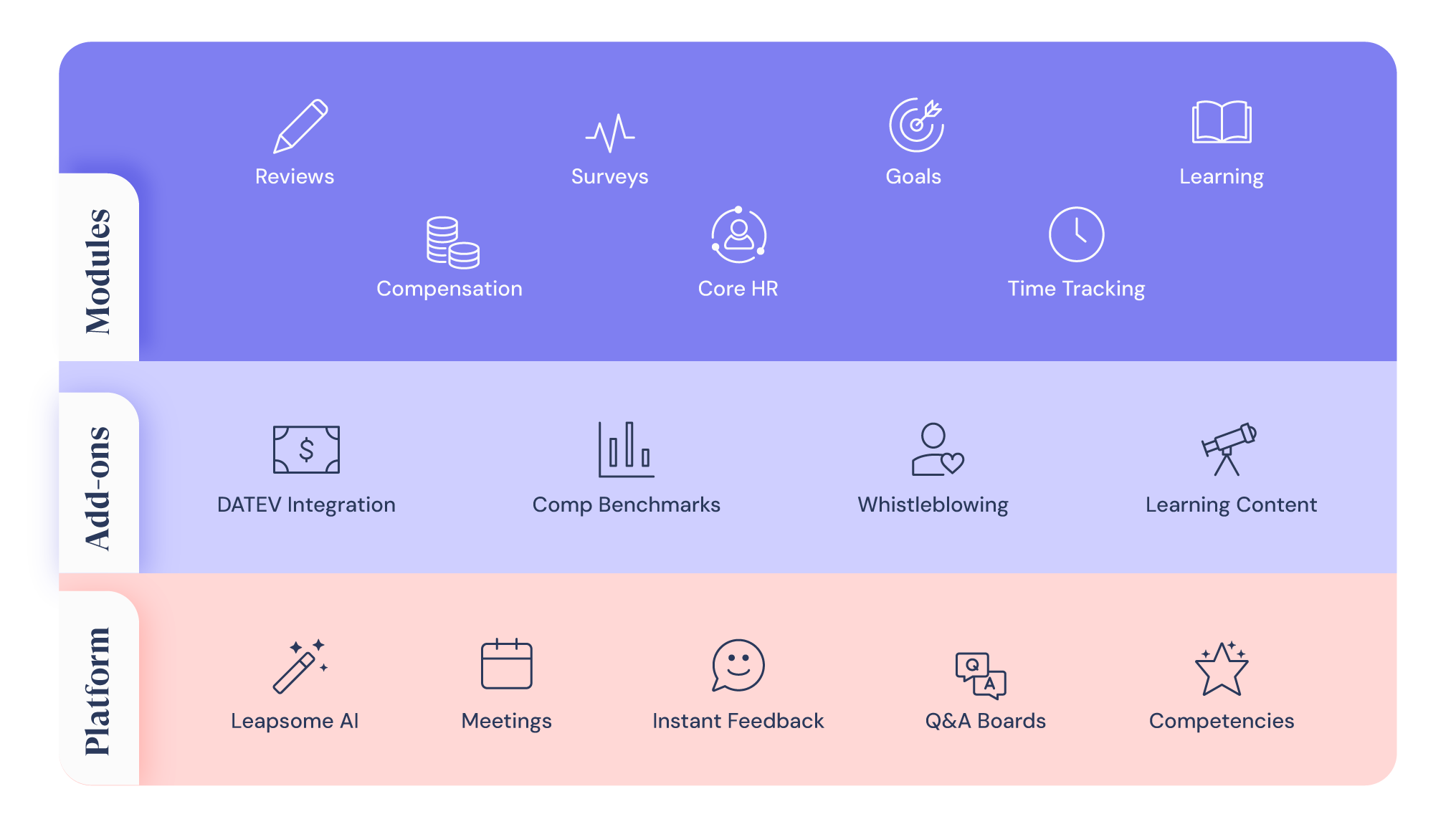
Leapsome’s comprehensive HR platform can meet your organization’s needs now and in the future world of work
1. Assess organizational “needs” & “wants”
It may be tempting to google all of the leading HRIS software companies and start there — but this is the fastest route to confusion and overwhelm. Doing so would be like going to the grocery store without a list.
Your first step when selecting an HRIS system should be figuring out your company’s primary HR needs and how you want your HRIS to address them.
Consider:
- Existing HR challenges. What does your team experience problems with on a regular basis?
- Current HR data management apps and systems. Get crystal clear on what’s working and what’s not so you can reduce your tech stack and avoid tool overload.
- Tasks or manual administrative work that overload your to-do list, especially those you could streamline or automate.
- Projects and initiatives you’d want to invest more time into if you could.
- Your dream HR set-up for onboarding, performance management, compensation, development, and other people enablement tasks — alongside an HRIS platform.
In addition, talk to team members across the entire organization and ask them to share the changes they’d like to see in HR. Would they welcome a self-service portal for requesting PTO? How about having more control over their own data management? Could the onboarding process be easier? What about gaining deeper insights into their KPIs or setting and tracking OKRs?
As an example, one study found that nearly 25% of companies were looking to adopt an HRIS to bring them greater functionality, while 21.2% wanted to use an HRIS platform to consolidate disparate systems.
Once you understand your organization’s requirements, you’ll have your “shopping list” ready, making it much easier for you to move forward. You likely won’t have to start this list from scratch; you can use your company’s existing KPIs, values, and OKRs as a starting point.
2. Match “wants” to your reality
Now that you’ve figured out your organizational needs, it’s time to fit them into a realistic framework that reflects your business’ situation.
Reflect on:
- Your resources. How many people will use the HRIS?
- Your budget. Few organizations choose an HRIS based on price alone (in fact, one study revealed that average HRIS spend per user was similar across small, medium, and large companies), but it’s still an important consideration.
- Your other tools. How will your new HRIS platform fit in with them? Could it integrate with the apps you use — or even allow you to streamline your stack?
You might also ask yourself and your team the following questions to further understand how different HRIS options could serve you:
- Does the software meet your organization’s data security requirements (like ISO 27001 certification)?
- Will it simplify and unify data storage?
- What payroll features does it have? Are they automated and flexible?
- Does the HRIS offer time tracking?
- Will it save you time with automations and templates to help you manage workflows?
- How customizable is it?
- What kind of analytics does it offer? Can the platform provide data-backed, actionable insights?
- Does the HRIS allow employees to share anonymous feedback?
- What’s the customer experience offered?
Be sure to understand the parameters of your business before moving ahead to the next steps.
3. Research & evaluate options
Now’s the time to scope out options and choose your HRIS based on the work you’ve already done.
Ask yourself:
- How do the organization’s wants, needs, and resources match up to the options on the market?
- Does the team need to adjust its expectations?
- Do specific software solutions align with the company’s needs more closely than others?
- Do some platforms offer more than the business needs? Are other options not sophisticated enough?
Continue to talk to the People team, managers, and other employees at this stage. They could provide feedback on the initial shortlist, discuss needs more deeply, and help you evaluate how to select an HRIS that makes the most sense for all levels of your organization.
4. Demonstrate & demo
Now the fun starts! Request demos of different tools, sign up for free trials, and test-drive some brand new software.
The learning curve can be steep, but researching platforms can be exciting, too. You’ll get the chance to see what new technology can do for your business and explore the potential of HRIS software; ideally, you’ll begin to understand just how much the right one will improve your HR team’s workload and results.
This is the time to think about:
- UX — Is the platform’s UI easy to use? Do you find it intuitive? How’s the UX?
- Features — Does the solution have all (or most of) the functionalities you wrote in your “shopping” (step 1)? Will it help your company reach its goals faster? For example, Leapsome’s people enablement and HRIS tools include a Goals module that integrates seamlessly with the rest of the platform.
- Integrations — What other platforms and apps do you have access to? Will this HRIS solution integrate with them easily?
- Budget — How does the solution fit your budget, and how will the cost scale with your company?
- Pre-purchase support — Can you sign up for a call or demo with a real person and ask them all of your questions?
- Switching — How would you migrate from your existing systems to this one? How much downtime would be involved?
- Post-purchase support — Can you get reliable, helpful customer service if you need it after purchase? How? For how long?
5. Make a proposal & come to a final decision
With all your shortlisted software tested, demoed, compared, and contrasted, put together a proposal and reach a decision that everyone supports.
Go back to your original list of essentials and consider if your chosen solution delivers on your requirements:
- Are there any major stumbling blocks?
- How did your teams react to the demo(s) or trial?
- Are there any deal-breakers regarding your chosen solution that you need to work around or figure out before you can move ahead?
When presenting the proposal to stakeholders, it’s important to crunch the numbers and show that your HRIS selection makes sense financially.
For example:
- How many hours could you potentially save with the new tool?
- How much time are you spending on HRIS tasks that you could outsource to the new software?
- What impactful initiatives could you spend more time on after switching to this HRIS? How would these improve key metrics like employee churn and employee engagement?
Presenting specific data will help you deliver a persuasive case to stakeholders; you want them to see that the organization can’t afford not to back your choice.
6. Assess & re-evaluate regularly
Deciding on an HRIS tool doesn’t lock you in for life, and you should periodically re-evaluate whether it’s still working for your company; after all, even the “best” HRIS solution might not be “the one” for your organization forever.
If your organizational HR needs change, you may need to revert to step 1 of this guide and create a new, updated “shopping list.” That’s OK; as long as you don’t feel that you have to reassess your needs and software too frequently, these changes are expected as your company grows.
Reaching out to colleagues and asking for their opinions is one of the best ways to assess whether your HRIS software is working as planned (especially because employees are often the main beneficiaries of new HR tools).
Send surveys, track usage, and request feedback; the most useful HRIS tools (like Leapsome!) include features to help you do this.
How to future-proof your HR software investment
New HRIS software isn’t worth the expense if it can’t keep up with your organization’s changing needs. Here’s what to look for in a future-proof provider:
- Commitment to emerging technologies: Providers that leverage the latest tech, such as AI and automated workflows, signal a commitment to keeping up with the times.
- Industry-specific compliance requirements: Understanding the regulatory landscape in regions you do business in helps you decide which compliance features to prioritize.
- Tech stack flexibility: Products that take a modular approach offer the flexibility to upgrade your tech stack without having to migrate to a whole new system.
Key questions to ask during the software evaluation process
To evaluate vendors beyond the marketing copy, ask questions like:
- How long does implementation usually take for a company like ours?
- What level of customer support do you offer, and what are your response times?
- What integrations are available, and how easy will it be to connect the platform with our existing tools?
- How customizable is your software?
- What permission controls and security features do you provide?
- How do you handle global compliance and local labor law requirements?
- Can you walk us through how we’ll manage employee lifecycle events end-to-end?
- How do you ensure data accuracy across systems?
Common mistakes to avoid when choosing HRIS software
When selecting any new tool, knowing what not to do is half the battle. Avoid:
- Basing your decision on price alone: The right question isn’t “Which option is cheapest?”, but “Which option meets all our requirements while staying within budget?”
- Overbuying features: Getting taken in by specialized features you won’t actually use is a waste of resources.
- Ignoring integration needs: If your chosen platform doesn’t integrate well with the rest of your tech stack, you risk siloed data and manual workarounds.
Power growth with Leapsome’s HR software
If you boil it down to the basics, knowing how to choose the right HR software just means understanding your needs and evaluating providers. But the hard part is knowing what you actually need. Process matters, but people matter more, and the best platforms combine both worlds. That puts your team on a strong operational foundation, without losing sight of the people your efforts are supposed to serve.
Leapsome brings core HR functionality, like benefits administration and payroll, under the same unified platform as your performance management and learning initiatives. This eliminates double (or triple, or quadruple…) data entry tasks, and it replaces a stack of licensing fees with a single subscription. Most importantly, your team can make faster, better-informed decisions.
🎁 Get an all-in-one HR package with Leapsome
Leapsome gives HR teams industry-leading people enablement solutions and core HR features in a centralized platform.
👉 Request a demo
FAQ
What are the best HR systems for small businesses?
Small businesses usually operate with constrained resources, so your HR system should streamline and automate as many tasks as possible. Look for an all-in-one platform like Leapsome that handles admin — i.e., payroll processing, employee data management — and gives you tools to track and improve performance.
What business goals can an HR system support?
HR software helps SMBs achieve a wide variety of goals, such as:
- Reducing administrative burden
- Supporting data-driven decision-making
- Scaling HR operations
- Improving compliance
- Developing talent
Disclaimer: This article is for informational purposes only and doesn’t offer legal, tax, or financial advice. While we’ve done our best to ensure accuracy and completeness, we can’t guarantee everything is up-to-date or error-free. For tailored advice, we recommend consulting a qualified lawyer or tax advisor.
Emily Laytham


.jpg)



.jpg)