Eight best leave management software solutions for HR teams
.png)

Everyone needs a mental health day sometimes — but chronic absenteeism can point to underlying problems in the workplace. A strong leave management system helps HR teams understand the influences behind absences (such as illness versus high workload pressure and disengagement), and how absenteeism affects the employee experience.
Most organizations can track PTO, sick leave, and vacation days in some form. But more than half of organizations with 1,000 or more employees manage absenteeism manually or without a formal system.* Jumping between spreadsheets, email threads, and disconnected calendars makes it harder to apply policies consistently and give managers timely visibility into who’s out.
Moving away from manual tracking is a clear first step for HR teams, but just plugging time off into leave management software won’t solve absence management problems. The next logical step is connecting absence data to systems that show what’s happening across the business.
This guide compares eight leave management software solutions for HR teams. It also explains which features to prioritize and how to choose a system that helps you turn absence data into better decisions, not just cleaner records.
* TeamSense, Statistics About Absenteeism in the Workplace, 2025
Signs you need an online leave management software
“Frequent or prolonged absences can be a real indicator of disengagement…Reporting to leadership helps spot patterns early and address them.”
— Sophie O'Donoghue, Customer Success Coach, Leapsome
Most companies start looking for online leave management software when admin work, rather than strategic growth, becomes HR’s primary focus. Spending too much time checking PTO balances, answering policy questions, and reconciling spreadsheets before payroll’s due are clear signs your process needs support. But deteriorating data and slow decision-making are the first signals that it’s time to try leave management software.
Absence management starts to fall apart when leave data sits outside the systems that shape employee experience and performance. A spreadsheet can show that someone took five days off over a month, but it won’t connect the dots and show whether those repeated absences mean the employee’s at risk of burnout, suffering from low engagement, or getting inconsistent feedback and mentorship from their manager.
The volume and complexity of leave requests are also growing beyond what manual systems can handle. A survey run by AbsenceSoft found that 62% of HR managers have seen an increase in leave requests year-over-year, which makes disconnected leave workflows harder to sustain — especially as your company scales.
Here are some signs that you should consider adding leave management software:
- The data doesn’t match: HR records show one leave balance, while payroll shows another. That forces HR to investigate each discrepancy before approving leave or closing payroll. It also creates avoidable risk, since one outdated balance can lead to overused PTO or managers planning coverage around the wrong availability data. A connected leave management system keeps requests, approvals, and employee records aligned.
- Managers make different decisions on similar requests: If two employees receive different answers for the same type of leave request, your leave policy might be unclear. This disconnect often happens when managers have to rely on memory, old email threads, or informal team habits to check the rules. Online leave management software helps HR standardize approval workflows and apply policy rules consistently. The right program reminds managers of the context they need to make a decision about approving leaves, and creates a clear record of each outcome.
- You can’t connect leave patterns to business outcomes: Basic leave tracking software tells HR who’s absent, but it doesn’t show connections between time off and business metrics. Instead of looking at leave data in isolation, HR teams can spot issues and take action earlier if they have the tools to identify broader insights. For example, a Gallup study found that highly engaged teams have 78% less absenteeism and 14% higher productivity rates, which suggests that chronic absences should be a part of the same conversation as employee experience and performance.
- Policy complexity is growing faster than your current systems: Leave management gets harder when your company expands. A process that worked for your small team may become risky once HR has to juggle different policies across teams and regions. Rules for accruals, carryover, and approval can quickly outgrow manual tracking, especially if your company’s new markets have different public holidays and time off laws. Leave management software helps HR teams assign the right policy to the right employee group and reduce manual interpretation.
- Leave requests slow down because no one owns the next step: Employees might submit requests on time, but approvals sit with managers who aren’t sure whether they can approve them. HR then has to chase updates manually, which delays decisions and frustrates employees. Online leave management software gives each request a clear owner and approval record, so a thumbs-up doesn’t depend on frequent follow-up.
- PTO processes create friction in the employee experience: Busy employees shouldn’t have to message HR every time they want to confirm their leave balances, and managers shouldn’t need to ask who’s going away in order to redistribute workload. PTO management software with self-service platforms give employees instant visibility into balances and request status. Managers also get live access into team availability, which reduces workflow interruptions and speeds up decisions.
“Managers shouldn’t email HR to ask who’s on leave or what a team’s balances are; they should see it live. The moment people self-serve, interruptions drop and decisions speed up.”
— Carolin Leidel, Consultant, torq.partners
Eight top absence management software solutions on the market
- Leapsome: Best for growing teams seeking a robust human resources information system (HRIS) that unites strong absence management and time-tracking functions with people enablement features.
- BambooHR: Best for small businesses looking for a simple leave-tracking tool with fewer employee engagement capabilities.
- Workday HCM: Best for enterprise-level companies needing integrated absence management as part of a broader human capital management (HCM) platform.
- ADP Workforce Now: Best for global companies wanting to consolidate global payroll and leave management.
- Rippling: Best for small to medium-sized tech-forward companies looking to integrate absence management with payroll, IT, and benefit administration.
- Factorial: Best for small to medium-sized businesses seeking absence management features and additional HR functionality but not prioritizing People analytics.
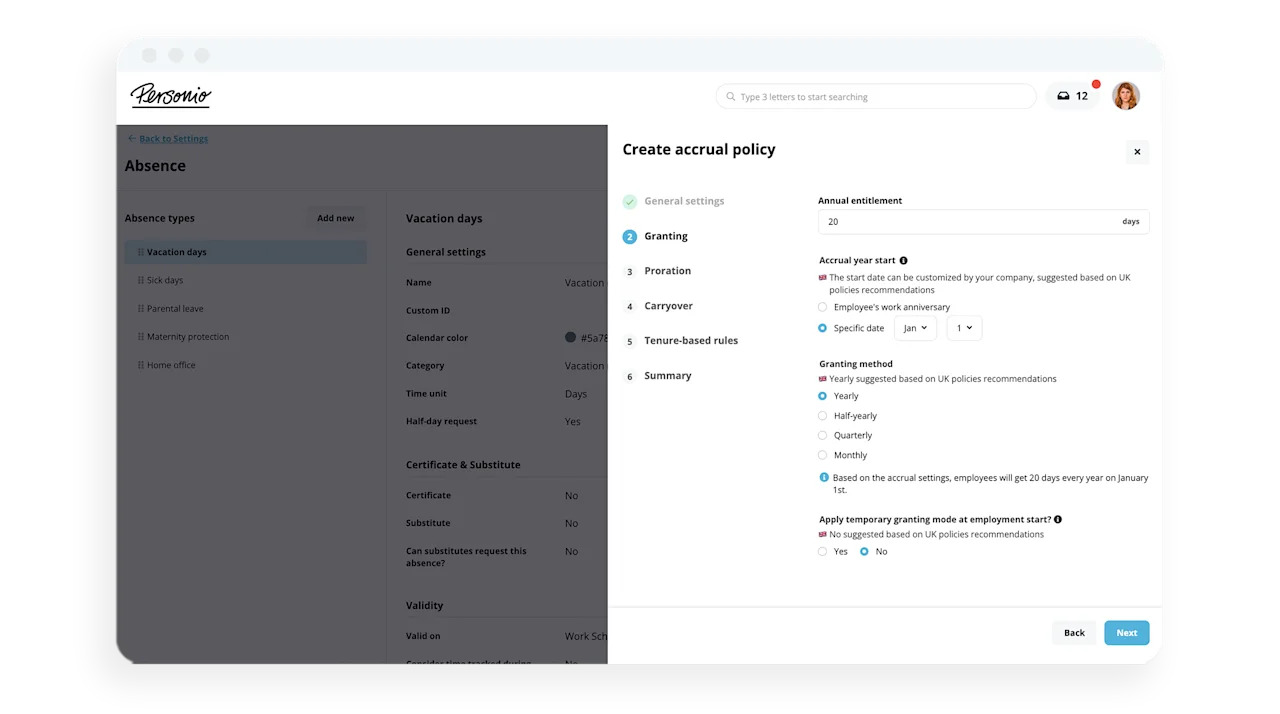
- Personio: Best for European organizations that want a leave-tracking tool with comprehensive HR functionality but don’t need built-in learning and development capabilities.
- Deel: Best for global companies managing international contractors or employees who need localized, compliant absence management.
1. Leapsome
.png)
Main features
- PTO management — Standardize approval workflows, automate balance calculations, and allow employees to check their leave entitlements.
- Attendance policies — Create customized attendance policies and assign them to distinct groups of employees (for example, those working in different offices or countries).
- Real-time calendar — Verify who’s out of the office on any given day.
- Time tracking — Track employee working hours, support compliance with applicable labor laws, and sync timesheets with payroll.
- Reporting & analytics — Automatically generate absence reports and view real-time insights into critical metrics like absenteeism rate.
- Payroll — Develop and manage payroll policies, take care of payroll preparation, automate payroll cycles, and export payroll data.
Pros
- Combines core HRIS tools with industry-leading people enablement features
- Granular automations and powerful AI capabilities
- Lower price point than many other options on this list
- Employee self-service portal makes it easy to submit PTO requests
- Robust, integrated People analytics to fuel data-driven decision-making
- User-friendly, intuitive interfaces for HR leaders and employees alike
- Supports an impressive 38 languages
- Award-winning customer success team
- ISO 27001:2022 certified and GDPR/CCPA compliant
Cons
- Some newer HRIS features are still being developed
- The range of tools can lead to an initial learning curve
Pricing
Leapsome’s modular pricing varies based on usage and organization size.
📈 Ready to upgrade your leave management strategy?
Learn why Leapsome users love our people-first approach to core HR processes like absence management.
👉 Book a demo
2. BambooHR

Main features
- PTO management — Manage leave requests and view team calendars to keep track of who’s away.
- Time off calculator — Calculate PTO accruals and forecast how much time off employees will have on specific dates.
- Policy creation — Build policies for different types of leave, including custom accruals (carryovers, waiting periods, and maximum balances).
- Time tracking — Allow employees to clock in and out of work, automate time entry approval workflows, and export timesheet data for payroll.
- Reporting & analytics — Filter data by employee, department, or date and generate basic reports.
Pros
- Several HR capabilities outside of absence management
- Quick setup for small HR teams
- Simple, aesthetically pleasing user interface (UI)
- Self-service options make it easy for employees to submit time-off requests
- Users report good experiences with customer support
Cons
- No advanced absence planning or capacity forecasting
- Limited analytics and benchmarking
- Not ideal for global teams
- Some users say customization options are lacking
- Some users mention limited reporting capabilities
Pricing
BambooHR’s pricing isn’t readily available.
3. Workday HCM
.png)
A screenshot of Workday's time and scheduling hub.
Main features
- PTO management — Centralize leave tracking, support global compliance, check real-time PTO balances, and view team calendars.
- Automated approvals & reminders — Send and receive automated reminders when team members request time off.
- Policy creation — Develop custom attendance policies, automate tracking and enforcement, and create documentation for disciplinary actions like written warnings.
- Time tracking — Allow employees to clock in and out of work, define rules for time entry formats, apply custom business rules, and set up multilevel timesheet approvals.
- Reporting & analytics — Access real-time absence dashboards, generate custom, no-code reports, and support audit and compliance tracking.
- Payroll — Process payroll in the United States, Canada, the UK, and France. Access a range of integrations with third-party payroll providers for other countries.
Pros
- Integrated with a full HCM tech stack
- Good for compliance and strategic HR
- Flexible report builder
- International presence
- Employee self-service portal streamlines absence management
- Users praise the platform’s ease of use
Cons
- It may be overly complex for smaller businesses and startups
- Complicated implementation and configuration
- Users report a high price point, which may be prohibitive for small businesses and startups
- Users mention that Workday has a steep learning curve
Pricing
Workday’s pricing isn’t readily available.
4. ADP Workforce Now
Main features
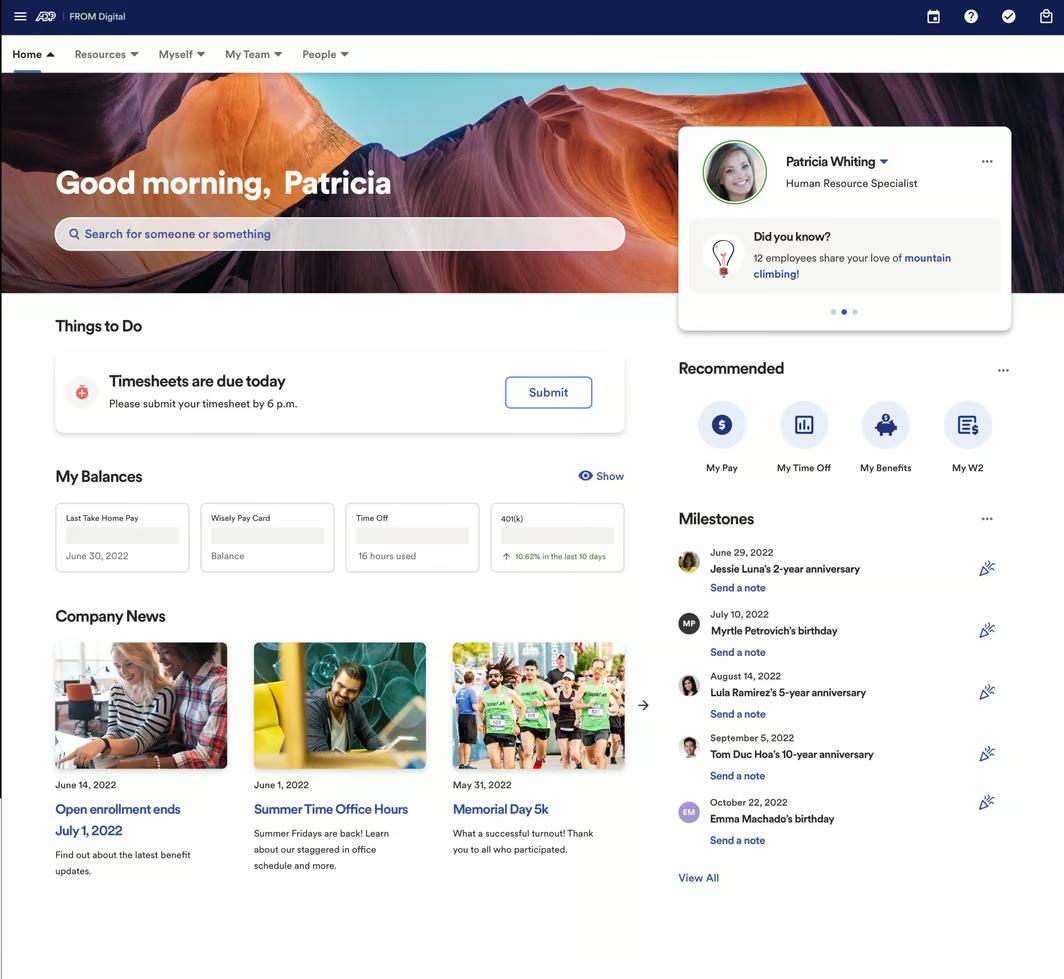
- PTO management — Configure rules for various leave types, automate accrual management, enable self-service time-off requests, and support eligibility and compliance tracking.
- Time tracking — Allow employees to track time by web clock, physical time clock, mobile app, or manual entry. Streamline timesheet management and approvals and sync with the payroll function.
- Reporting & analytics — Create standard payroll reports, build custom reports, and access dashboards showing PTO usage trends, pending actions, and labor cost trends.
- Payroll — Automate payroll processing, handle tax calculations and filings, and make retroactive adjustments and off-cycle payroll runs.
Pros
- Strong payroll integration
- Wide variety of HR capabilities outside of absence management
- Compliance tracking and documentation
- Employee and manager self-service capabilities
- Policy-based automations
- Audit-ready history
- Scalable
Cons
- Well-established in the US, not as strong in international markets
- Users feel the UI is clunky
- Users report slow and frustrating customer support
- Users say new features are difficult to integrate at first
- Users mention PTO requests can be buggy
Pricing
ADP Workforce Now’s pricing isn’t readily available.
5. Rippling
.png)
Main features
- PTO management — Manage PTO accruals, automate approval workflows, and support compliance.
- Policy creation — Create custom attendance policies (for example, by setting accrual caps, carryover rules, and eligibility criteria).
- Time tracking — Automate and streamline employee time management with various time capture methods, alerts for events like overtime or missed breaks, and compliance support.
- Reporting & analytics — Use prebuilt reporting templates and analyze time off and leave patterns.
- Payroll — Automate payroll, handle tax filings, support global compliance, and process off-cycle payroll runs.
Pros
- Absence management features integrate deeply with payroll and benefits
- Tilt integration allows for a highly personalized leave management experience
- Support global compliance
- Real-time reporting and audit trails
- Employee and manager self-service capabilities
- Users report that Rippling is intuitive for employees and HR admins
- Users praise Rippling’s library of integrations
Cons
- Currently only supports two languages
- Tilt integration required for some leave management capabilities
- Some users feel Rippling is a complicated platform, which may be a barrier to small businesses and startups
- Some users report frustration with Rippling’s customer support
Pricing
Rippling’s pricing isn’t readily available.
6. Factorial
Main features
- PTO management — Streamline the entire time-off process, support compliance, and provide employees with self-service capabilities.
- Policy creation — Build and assign custom time off policies based on criteria like location, contract type, and department.
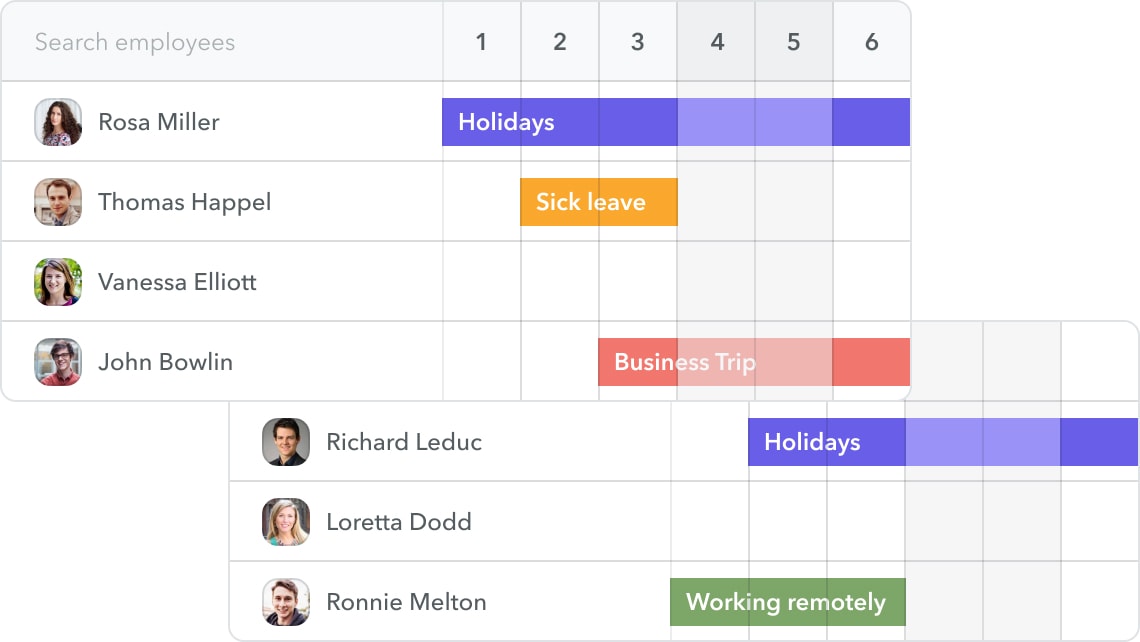
- Real-time calendar — View approved and pending absences, check which employees are off, and sync with external calendars.
- Time tracking — Allow employees to clock in and out of work, automate timesheet management and approvals, and allow for custom schedules.
- Reporting — Track, analyze, and optimize organize-wide time-off trends with manager dashboards, automated reports, and various data visualization options.
- Payroll — Carry out payroll if your business is located in Spain. Integrate with third-party payroll systems for payroll preparation in other countries.
Pros
- A good all-in-one HR solution for SMBs and mid-market companies
- Custom workflows and policy flexibility
- Employee self-service capabilities
- Users appreciate Factorial’s ease of use, especially for global teams
- Users praise Factorial’s customer support
Cons
- Support and documentation vary by language and region
- Users feel reporting features are limited, especially as you scale
- Users report frequent price hikes
- Users say certain features are difficult to onboard, and customer support documents are lacking
Pricing
Factorial’s modular pricing starts at US$8 (user/month).
7. Personio
Main features
- PTO management — Allow employees to request time off, set up manager approval workflows, and calculate leave balances and accruals.
- Policy creation — Build customizable PTO policies, establish different leave types, and support compliance with local regulations.
- Real-time calendar — Get a real-time view of who’s out of the office.
- Reporting & analytics — Monitor absence trends, identify patterns, and make more strategic HR decisions.
- Time tracking — Enable employees to log their working hours (including by project), establish approval workflows, and set up hardware integrations for on-site tracking.
- Payroll — Take care of payroll processing (Germany only). Access other features to help with payroll preparation (like employee data management and payroll reports) in other countries.
Pros
- Well-established in Europe, especially Germany
- Good compliance support for European businesses
- Several additional HR capabilities
- Users enjoy the platform’s user-friendly nature
- Managers praise how easy it is for individual contributors to use Personio for time tracking and leave management
Cons
- Not ideal for global organizations due to European focus
- Basic tools for performance, engagement, and feedback
- No surveys or built-in LMS
- Some users report that technical issues hinder platform usability
- Others report challenges using Personio with a global workforce
Pricing
Personio’s pricing isn’t readily available.
8. Deel

Main features
- PTO management — Automate approvals and notifications, synchronize external calendars (like Google and Outlook), and assign coverage when employees are away.
- Policy creation — Create tailored time off policies, including options for paid/unpaid leave, accrual settings, and carryover rules.
- Time tracking — Enable employee clock-ins and clock-outs, make manual and bulk entries, set up approval workflows, and link time entries to specific projects.
- Reporting & analytics — Access real-time dashboards that display key HR metrics, generate customizable reports, and monitor compliance.
- Payroll — Take care of global payroll processing, support global compliance, use the Employee of Record (EOR) feature, and provide employees with self-service capabilities.
Pros
- Good for remote and distributed teams
- Supports global payroll and compliance
- Real-time compliance alerts
- Employer of record (EOR) function
- Self-service and transparency for employees
- Users praise the platform’s simple setup and onboarding process
- Users appreciate Deel’s UX
Cons
- Not ideal if most of your employees are based in just one country, as it’s designed with international teams in mind
- Not built for in-depth performance management
- No integrated learning and development features
- Limited customization capabilities for complex organizations
- Some users mention missing or lackluster reporting and analytics capabilities
Pricing
Deel used to offer a limited free plan, but it’s been replaced with a US$5 PEPM plan limited to core HR features (including leave management). More robust paid plans start at $29 PEPM.
Key absence management software features
Keep an eye out for these capabilities.
.png)
Automatic leave workflows
Leave requests shouldn’t require endless back-and-forth. Good absence management software lets employees submit requests and get manager approval in just a few clicks. Bonus points if the platform has a centralized team calendar.
“Dashboards remove the detective work. If a leader has a gut feeling about absence spikes, they can verify it in seconds and act. Real-time beats month-old exports every single time.”
— Florian Klages, Managing Partner, torq.partners
Customizable leave policies
Cookie-cutter attendance policies just don’t cut it for modern organizations. Custom guidelines allow you to support legal compliance across jurisdictions, support diverse team member needs, be more scalable, and facilitate a better employee experience.
Additional HRIS capabilities
An absence management tool that integrates seamlessly with other HR features like core HR, time tracking, and payroll ensures consistent workflows, saves money, and reduces administrative burden by consolidating multiple HR processes in one place.
Even better? If the platform also has people enablement features like Leapsome, you can invest in employees’ development and your company’s long-term success.
Absence analytics & reporting
Leave management can get complicated, especially when it comes to custom policies and compliance across multiple business locations. Built-in analytics and reporting give organizations the visibility and insights to spot patterns, support compliance, and enable more strategic HR conversations.
Evaluating software based on business needs
Your ideal solution depends on your company’s size, needs, and priorities. Keep these factors in mind as you decide.
Organizational size & growth goals
Small businesses need simplicity and affordability, while enterprises need customization, analytics, and compliance. When choosing a leave management solution, factor in your company size and future growth plans. If scaling is on the horizon, pick a modular platform like Leapsome that can adapt as you grow.
Remote and hybrid workforce needs
If your team is remote, distributed, or hybrid, choose a tool that supports global compliance and allows you to create custom attendance policies for employees in different countries. Look for self-service capabilities, an intuitive UI, and integrations with communications tools like Slack and Microsoft Teams.
Budget considerations
It’s no secret that budget is an important consideration in any software selection process. After all, our research found that half of all People leaders faced budget cuts recently, and 85% felt pressured to reduce HR budget and consolidate HR tools.
Streamline your absence management system with Leapsome
Whether you’re a small business looking for simplicity and affordability or a global enterprise needing compliance support and custom reporting, the right leave management system can transform your internal operations for the better. The good news is that the perfect solution is almost certainly included on the list you’re reading right now!
We think Leapsome could be an excellent option for your organization. Our absence management platform is an intuitive, all-in-one solution backed by robust HRIS and time-tracking capabilities. With automated leave tracking, customizable policies, and built-in analytics, managing absences has never been easier.
“Employees can now find everything in one place — their data, absences, goals, and reviews. I don’t have to explain which tool to use for what. It’s all in Leapsome.” — Merilyn L, Senior People Operations Specialist at Bob W.
☑️ Customization, analytics, superior UX — Leapsome has it all
We’re here to make your HR processes and leave management experience seamless.
👉 Book a demo
FAQ
What’s the best absence management software?
The best absence management software depends on your company’s size, locations, and policies, as well as your growth and HR goals. It should help your HR team (and managers) apply policies consistently and understand patterns by connecting absence data to employee experience metrics.
For smaller teams, a simpler leave tracking software tool may be enough if the main goal is to replace spreadsheets and speed up PTO approvals. Scaling teams that want absence management as part of a larger HRIS, Leapsome is a strong option. The all-in-one HR platform puts leave tracking, employee files, and performance-related context in conversation, so you can analyze the big picture.
Is there an app for managing leave?
Many leave management platforms also have apps, so employees can request time off, check balances, and see approval status from their mobile devices. Apps also make managers and HR team members’ lives easier, as employee portals reduce repetitive questions and keep approvals moving quickly.
The best app for managing leave should connect with the systems you already use for HR tasks like payroll prep and employee surveys. Without those integrations, your team may have to manually reconcile data after requests are approved.
Can leave management software help with FMLA tracking?
Yes. Family and Medical Leave Act (FMLA) absences can get complicated, so leave management software can help HR teams track them more accurately — especially when employees use leave intermittently or when several leave types overlap. The software centralizes the extra documentation necessary for FMLA compliance and makes it easier to see how much leave an eligible employee has used and what still needs review.
However, FMLA compliance still needs significant oversight. Software can support tracking and documentation, but HR teams should personally confirm eligibility and review any case-specific requirements before making a final decision.
Emily Laytham

.jpg)




.jpg)