8 best workforce analytics software platforms for 2026


Research shows 93% of HR teams document employee skills in HR systems*, yet many still struggle to use that data for workforce planning or performance decisions.
That’s where workforce analytics software comes in. These platforms bring together data from HR systems, analyze it to reveal patterns, risks, and opportunities, and help HR leaders make strategic decisions that the business can trust.
This article compares the top workforce analytics software platforms built to close that gap: connecting data, insight, and action. We’re focusing on tools that unify workforce data, deliver actionable insights, and support ROI-driven people decisions for mid-market and enterprise teams, so you can pick whichever fits your business.
📊 Turn people data into decisions leaders trust.
See how Leapsome helps HR teams connect workforce data, surface clear insights, and drive action through a single integrated platform.
👉 Explore Leapsome’s people analytics
* McKinsey, 2025.
Top workforce analytics software for 2026
To build this list, we compared the best workforce analytics software based on analytics depth, HRIS integration, configurability, AI support, scalability, and fit for modern HR teams.
Each platform approaches data-driven workforce analytics differently: some prioritize embedded insights across performance and engagement, while others focus on specialized analysis or workforce monitoring.
Understanding these trade-offs upfront helps teams avoid short-term wins that create long-term limitations.
If you’re still early in the buying process, reviewing guidance on selecting the right HR software and this comprehensive HR analytics guide can help you align tool capabilities with your organization’s maturity and goals.
Disclaimer:
Information is accurate as of February 2026, based on publicly available product documentation, vendor websites, and review platforms. Features and capabilities evolve over time. Buyers should validate details directly with vendors before making a final decision.
{{TABLE}}
Leapsome: best for unified workforce analytics in a modern HRIS
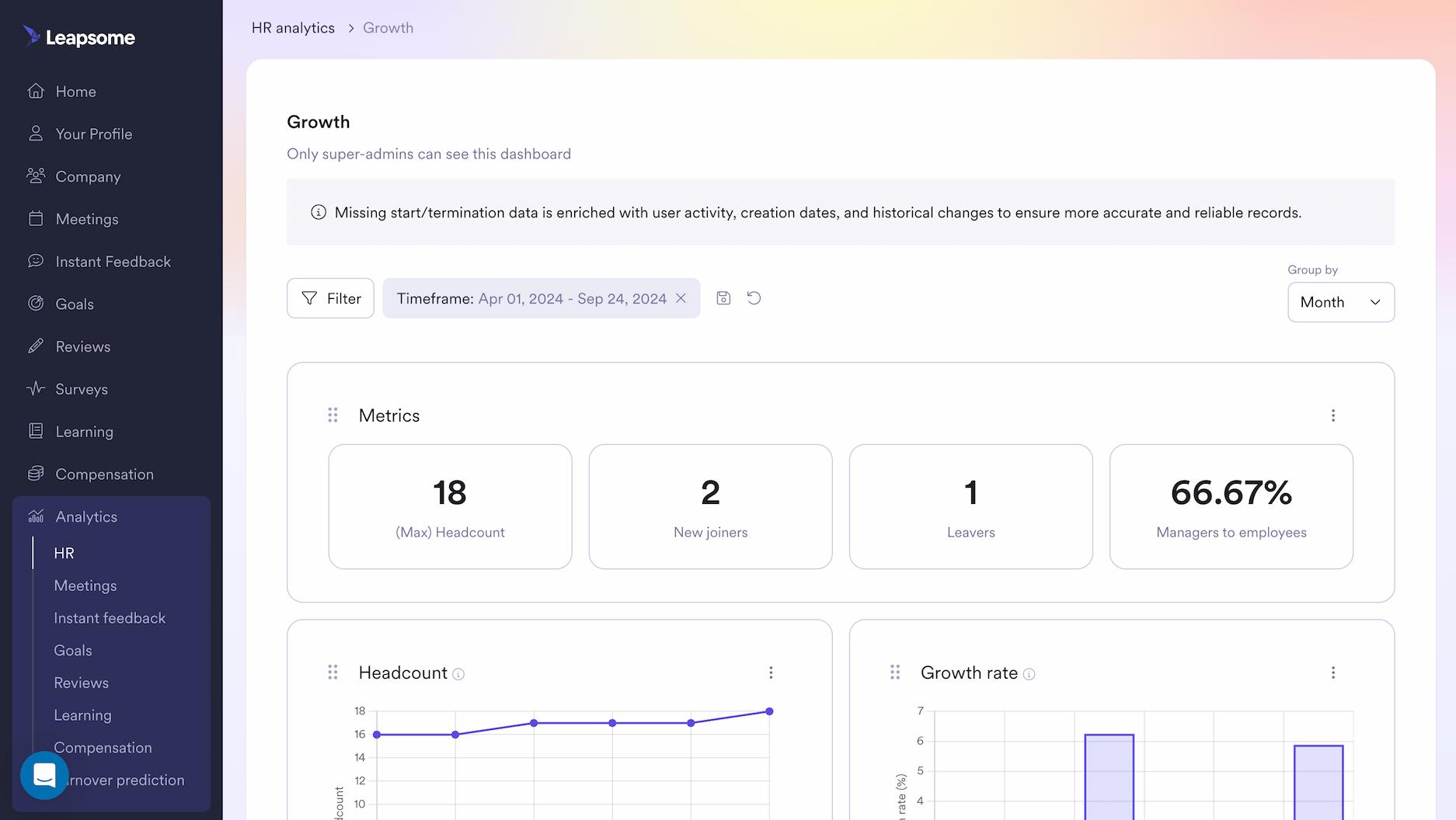
Leapsome is a modern workforce analytics software solution built into a fully integrated HRIS, designed to help HR leaders move from fragmented reporting to clear insights leaders can act on.
Instead of treating analytics as a standalone layer, Leapsome connects core HR data with performance signals, engagement inputs, goals, and compensation data in a single, configurable analytics environment — purpose-built for strategic HR decision-making.
Leapsome’s workforce analytics and insights approach prioritizes context and action. Data from pulse surveys, reviews, and goals flows directly into manager workflows, development planning, and compensation cycles.
This allows HR teams to analyze trends, explain outcomes, and act without needing to export data or stitch together reports across tools. Analytics are designed to support managers and leaders in making better decisions, not to monitor individual activity or behavior.
Key features
- Unified workforce analytics across HRIS, performance, engagement, goals, and compensation
- Configurable dashboards and custom reporting for HR and leadership teams
- AI-assisted insights with human review and organizational context via AI-powered HR tools
- Connections between analytics, setting and tracking OKRs, and compensation management solutions
- Analytics embedded in a modern HRIS platform, not bolted on
- Connections between analytics, setting and tracking OKRs, and compensation management solutions
Pros
- Analytics embedded directly into a modern HRIS
- Strong balance between quantitative data and qualitative inputs
- Built for ROI storytelling, executive reporting, and strategic alignment
Limitations
- Not designed for employee activity, time-on-screen, or surveillance-style monitoring
- Best value realized when multiple Leapsome modules are used together
Ideal use case
Mid-market to enterprise organizations replacing disconnected HR tools and spreadsheets with a single people analytics layer, especially for teams under pressure to prove HR impact. Leapsome helps managers gain actionable insights and unify data across the employee lifecycle.
Learn more about Leapsome’s people analytics and insights and how they support confident, business-aligned HR decisions.
What customers say about Leapsome
- “Employees can now find everything in one place — their data, absences, goals, and reviews. I don’t have to explain which tool to use for what. It’s all in Leapsome.” — Merilyn L, Senior People Operations Specialist at Bob W
- “[...] I really love how easy the system is to use and how it can be tailored to fit your existing processes. It delivers so much data. [...] There are a lot of initiatives coming out of the use of Leapsome.” — Tina Chater, Director People and Organization at xy Axel Springer
🧩 Unify workforce data across one connected HR system.
Discover how Leapsome’s modern HRIS brings workforce data, performance, and planning together, so insights stay consistent, and decisions move faster.
👉 Explore Leapsome’s HRIS
Personio: best for workforce analytics for Europe-based SMBs
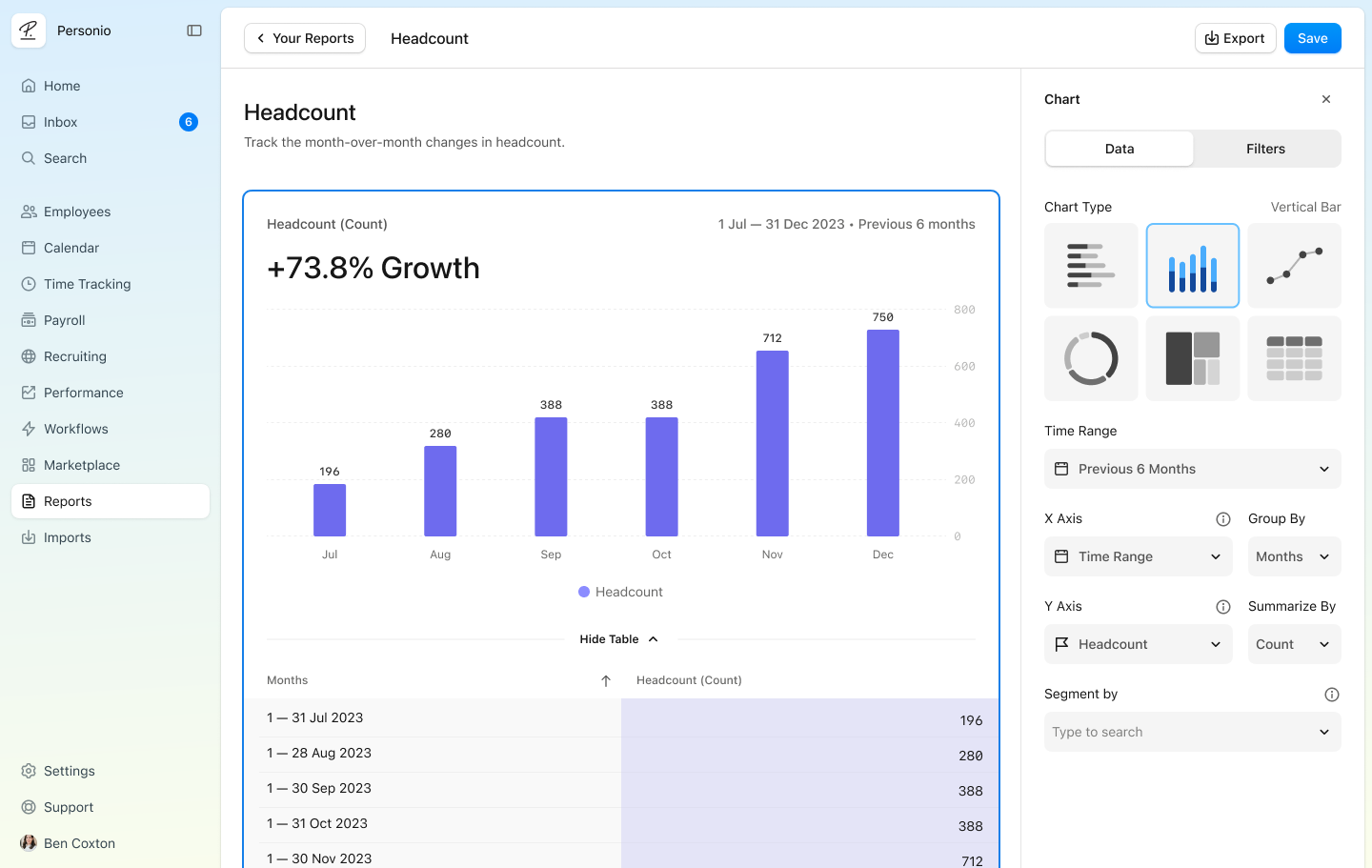
Personio offers workforce analytics as a native HRIS capability, not a separate analytics layer.
Its workforce analytics software focuses on providing HR teams with clear visibility into headcount, employee lifecycle events, and core people metrics, directly within the system they already use for day-to-day HR operations. The emphasis is on operational clarity and compliance rather than advanced modeling or productivity tracking.
Analytics in Personio are integrated with core HR data, making it easier for European SMBs to answer common questions about turnover, absences, and workforce composition.
Key features
- Workforce analytics based on core HR, headcount, and employee lifecycle data
- Standard reporting on turnover, absences, and workforce demographics
- Analytics embedded directly into the HRIS, with no standalone analytics module
Pros
- Simple access to workforce data without separate analytics tools
- Strong fit for European HR workflows and regulatory environments
Limitations
- Limited advanced analytics and predictive capabilities
- Less flexibility for complex organizational structures or global teams
Ideal use case
European small to mid-sized companies that want basic workforce analytics tightly integrated into their HRIS, primarily to support operational reporting and compliance rather than strategic or predictive analysis.
What customers say about Personio
- “[What I like best about Personio is] the analytics part for the reports and the organization tab, where you can have a good overview now and filter employees.” — G2 reviewer
- “One standout aspect is its new report design capabilities, which help HR professionals to generate reports easily. Personio’s user-friendly interface and advanced analytics have streamlined our administrative tasks and enhanced organizational efficiency.” — G2 reviewer
Rippling: best for workforce analytics across HR, IT, and finance
.png)
Rippling approaches workforce analytics software from a systems perspective, bringing together data from HR, payroll, IT, and spend management under a single employee record.
Rather than positioning itself as a dedicated people analytics solution, Rippling focuses on cross-functional visibility and helps organizations understand how workforce data connects across operational domains.
Analytics in Rippling help track workforce-related activity across systems, including device usage, payroll changes, and operational costs. This makes it easier to run user behavior analytics (although they’re not judging output based on activity alone) and cross-system reports without manually reconciling data from multiple tools.
Key features
- Workforce reporting across HR, payroll, IT, and spend data
- Cross-system analytics enabled by unified employee records
- Custom reports spanning multiple operational domains
Pros
- Broad visibility across employee-related systems
- Strong integration between HR and IT data
Limitations
- Analytics depth depends heavily on which modules are enabled
- Less emphasis on qualitative, performance, or development-driven insights
Ideal use case
Organizations that want operational workforce analytics across HR, IT, and finance. Rippling is a strong fit for teams prioritizing system consolidation and cross-functional reporting over deep people analytics or performance-focused insight.
What customers say about Rippling
- “Rippling has a strong side for analytics and custom dashboards, enabling real-time insights across people, compensation, and customer experience.” — G2 reviewer
- “My previous company used Rippling. It seems to have good integration with many integrators, including equipment disbursement monitoring and benefits.” — Reddit user
ADP Workforce Now: best for enterprise workforce planning and payroll-based analytics
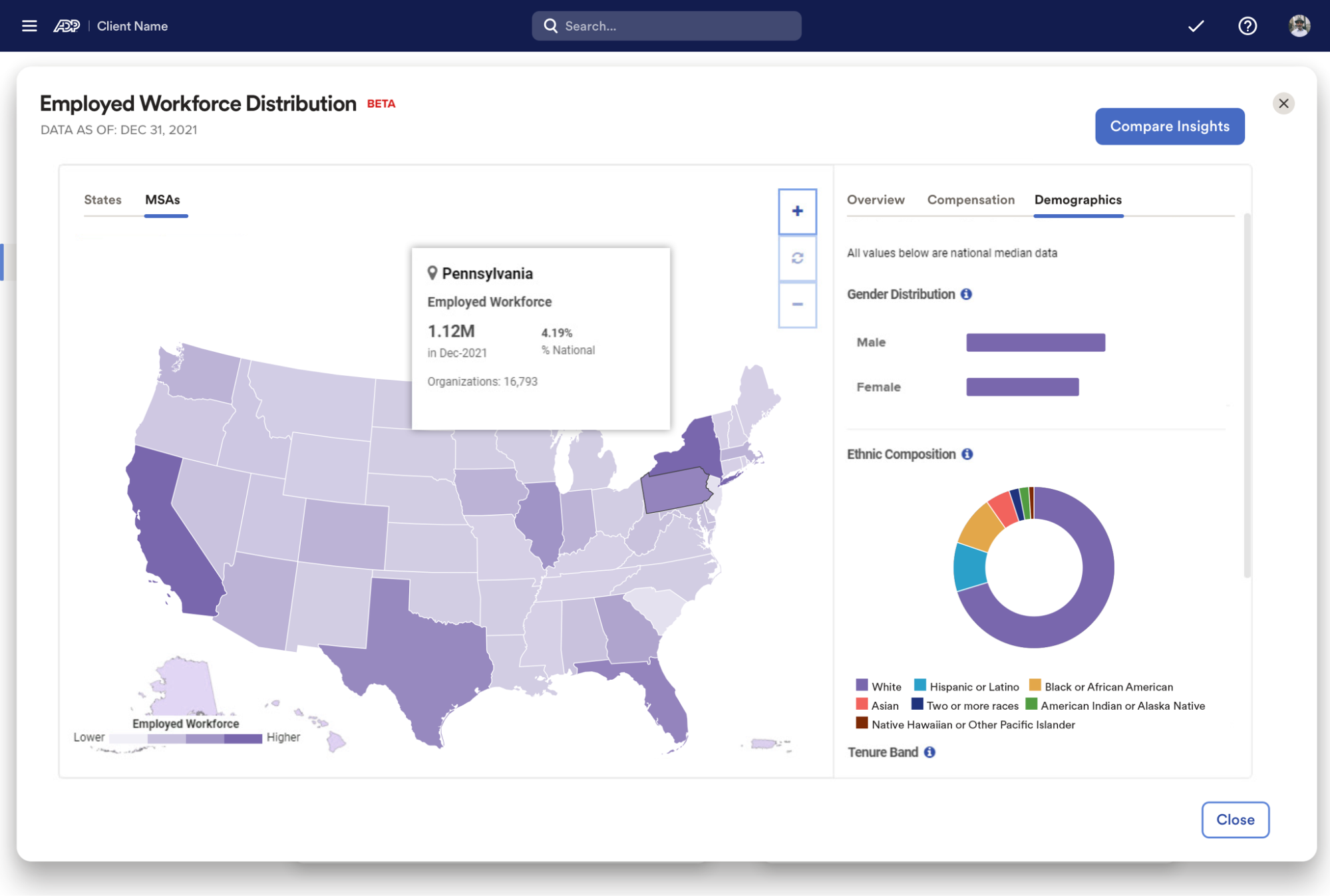
ADP Workforce Now delivers workforce analytics and insights grounded in payroll, time, and core HR data.
The analytics layer is designed to support enterprise workforce planning, labor-cost visibility, and regional reporting, with an emphasis on administrative accuracy and compliance rather than real-time productivity signals.
For organizations already standardized on ADP, analytics are embedded directly into existing HR and payroll workflows.
Key features
- Analytics built on payroll, time, and HR data
- Workforce cost, labor utilization, and compliance analysis
- Enterprise reporting across regions and business units
Pros
- Deep administrative and payroll data coverage
- Strong compliance and workforce cost insights
Limitations
- Limited real-time productivity context
- UX and configuration complexity for non-enterprise teams
Ideal use case
Large enterprises already using ADP for HR and payroll that want embedded workforce planning & analytics software without adding a separate analytics platform.
What customers say about ADP Workforce Now
- “The reporting and analytics features are useful for monitoring workforce trends and ensuring regulatory compliance.” — G2 reviewer
- “I also find the custom reporting tools very useful for gaining insights into workforce trends or for quick research, analytics, and adjustments are easy through the employee data imports.” — G2 reviewer
Lattice: best for workforce analytics focused on performance and engagement
.png)
Lattice approaches workforce analytics software through the lens of employee performance and engagement.
Analytics are primarily surfaced in performance reviews, engagement surveys, and goal-tracking workflows, giving HR teams and managers visibility into trends in how teams perform and engage over time.
Reporting is structured around prebuilt dashboards rather than open-ended workforce modeling.
Key features
- People analytics tied to performance reviews, engagement surveys, and goals
- Prebuilt dashboards for engagement trends, performance cycles, and manager effectiveness
- Analytics delivered through performance and engagement workflows
Pros
- Strong analytics around engagement and performance cycles
- Clear visual dashboards for managers and HR leaders
Limitations
- Workforce analytics largely centered on performance and engagement data
- Limited depth in core HRIS and administrative workforce data compared to full HRIS platforms
Ideal use case
Companies that prioritize performance management and engagement analytics over HRIS-led workforce analytics.
What customers say about Lattice
- “I especially appreciate the enhanced analytics dashboard. It provides clearer, actionable insights into employee engagement and progress.” — G2 reviewer
- “The built-in analytics and calibration features are incredibly powerful, providing valuable insights into employee performance and making it much easier to manage the review process and promotion cycles effectively.” — G2 reviewer
HiBob: best for mid-sized companies needing built-in workforce analytics
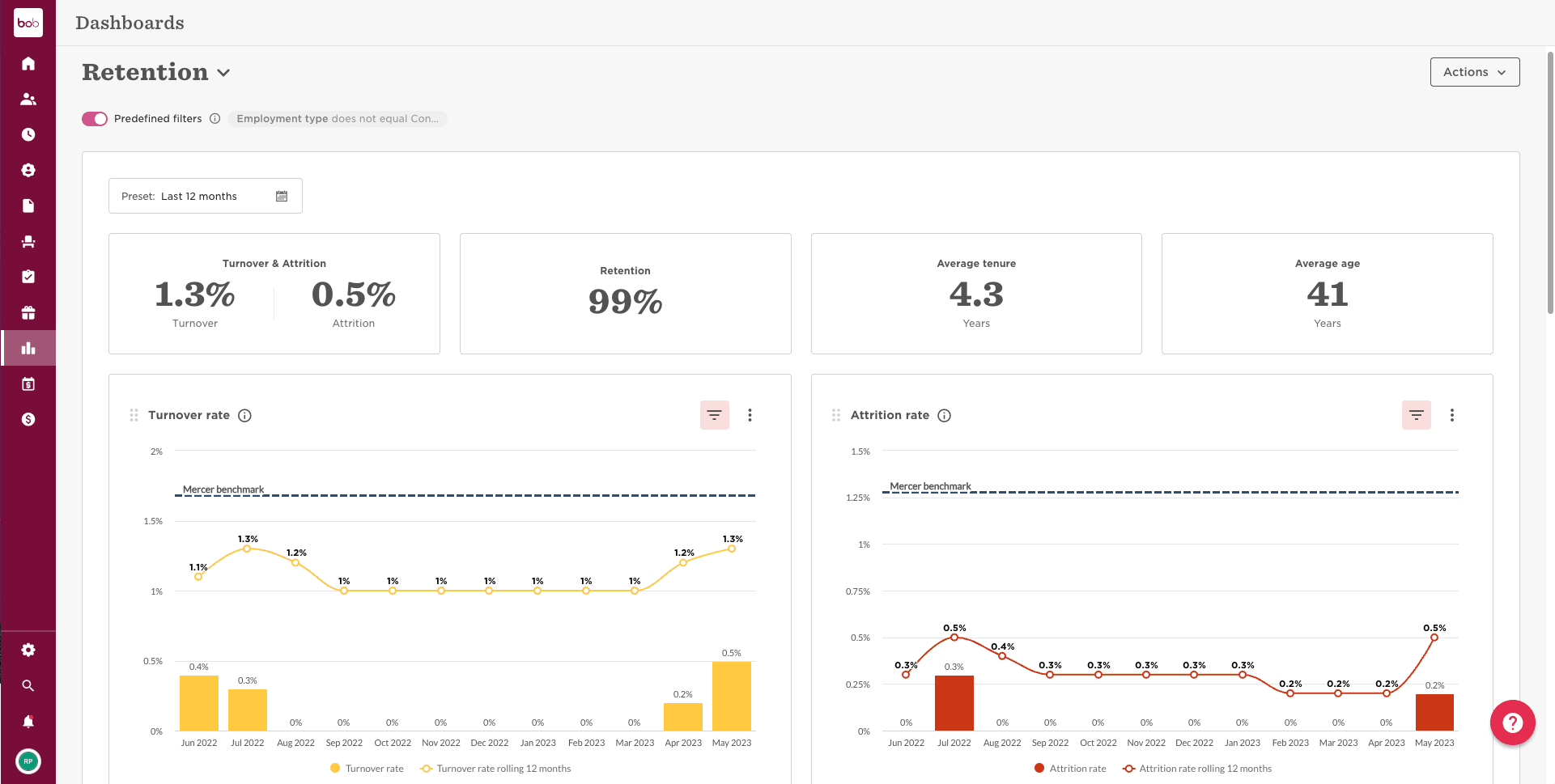
HiBob provides workforce analytics software embedded directly into its HRIS, combining core HR data with engagement and compensation inputs.
Analytics focus on headcount, turnover, lifecycle events, and engagement trends, delivered through prebuilt dashboards and configurable reports designed for growing organizations.
Through this approach, HR teams can get fast visibility into workforce trends without requiring a separate analytics tool or advanced data setup.
Key features
- Workforce analytics built on core HR data, engagement surveys, and compensation
- Prebuilt dashboards for headcount, turnover, and engagement
- Configurable reports across employee lifecycle events
Pros
- Native HRIS with embedded people analytics
- Designed for mid-sized, fast-growing companies
Limitations
- Advanced analytics and modeling are limited compared to specialized analytics platforms
- Custom reporting depth varies by module
Ideal use case
Mid-sized organizations that want an HRIS with built-in workforce data insights rather than a separate analytics tool that sits outside your HR system.
What customers say about HiBob
- “I like that HiBob HRIS is easy to use and allows me to do a lot of things, from creating reports and analytics to sending out forms and gathering data insights.” — G2 reviewer
- “We've used HiBob for a few years now and been very happy. It's user friendly and we like the integration of multiple options, like payroll and onboarding.” — Reddit user
SAP SuccessFactors: best for global enterprise workforce analytics at scale
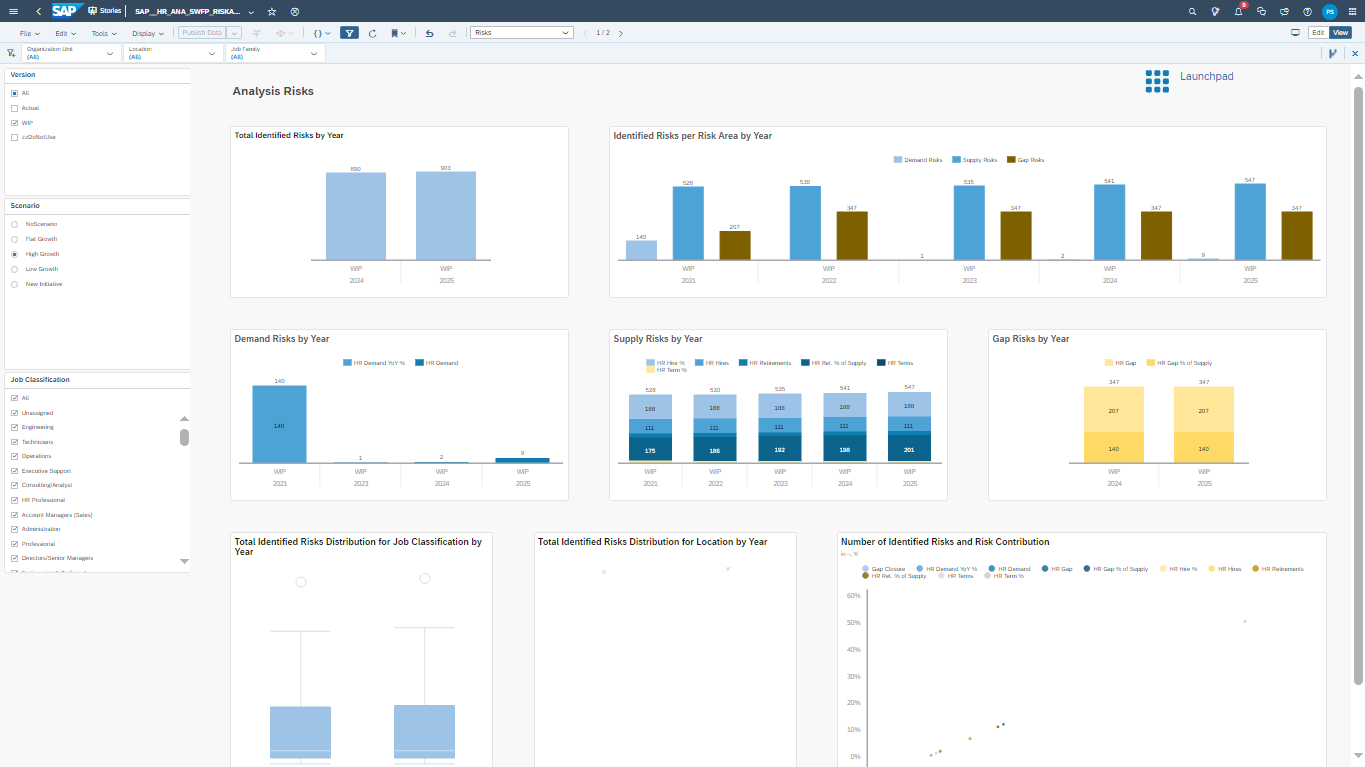
SAP SuccessFactors supports workforce analytics and insights across large, complex organizations by combining HR, talent, and planning data with SAP People Analytics and SAP Analytics Cloud.
The platform is designed for standardized reporting, global workforce planning, and enterprise-scale analysis within the broader SAP ecosystem.
Key features
- Workforce analytics across HR, talent, and planning modules
- Integration with SAP People Analytics and SAP Analytics Cloud
- Enterprise-grade reporting and workforce planning
Pros
- Deep analytics across large, complex organizations
- Strong integration with the SAP ecosystem
Limitations
- Configuration and implementation complexity
- Less flexible for mid-market teams without existing SAP infrastructure
Ideal use case
Large enterprises operating within the SAP ecosystem that need workforce planning & analytics software at a global scale.
What customers say about SAP SuccessFactors
- “It’s relatively easy to use once configured, and the implementation is structured with good documentation and partner support. We use it frequently for core HR, performance management, and employee lifecycle activities, and it offers a wide range of features that cover most HR needs.” — G2 reviewer
- “It brings all HR-related tasks and information into one place. I can access all my employee data from a single location, which makes everything easier to find.” — G2 reviewer
Visier: best for advanced workforce analytics and predictive people insights
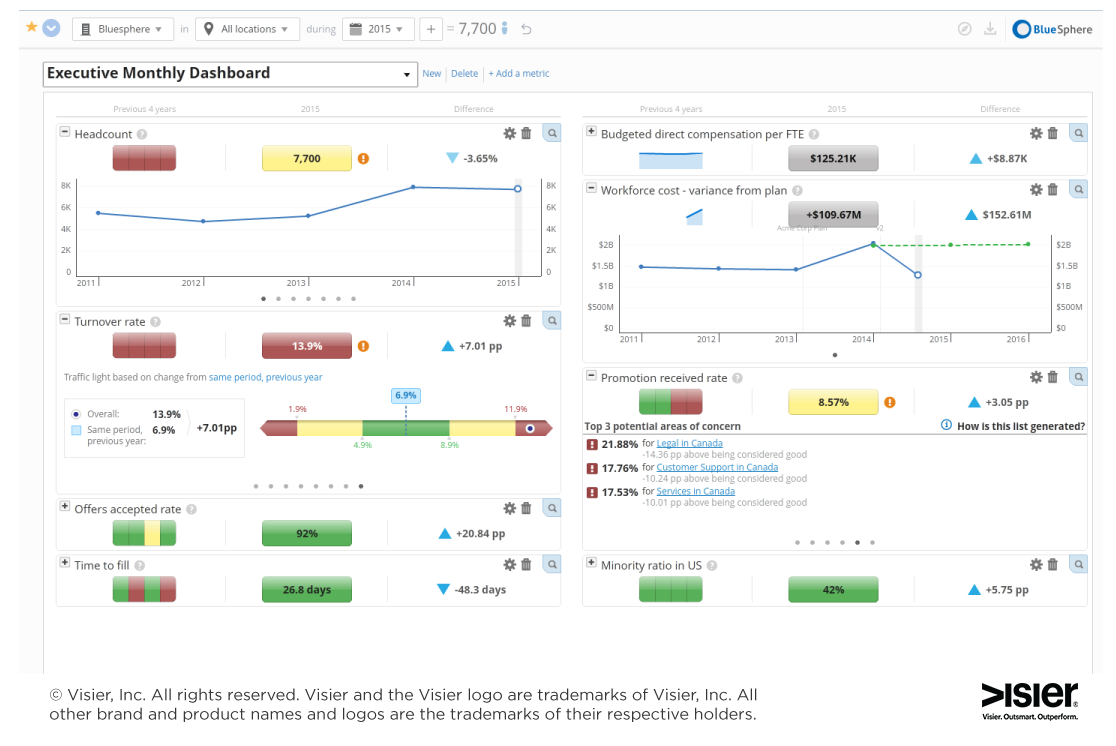
Visier is purpose-built for advanced workforce analytics software use cases, with a focus on modeling, benchmarking, and predictive analytics.
It operates as an analytics layer on top of existing HR systems, enabling mature people analytics teams to analyze workforce trends, retention risk, and organizational dynamics in depth.
Visier’s main strength lies in helping organizations answer complex questions about workforce risk, trends, and future scenarios using statistical and predictive models.
Key features
- Advanced people analytics and workforce modeling
- Prebuilt workforce metrics and external benchmarks
- Predictive analytics for retention and workforce trends
Pros
- Strong analytics depth and modeling capabilities
- Designed for mature people analytics teams
Limitations
- Requires high data readiness and governance
- Less suitable as a core HRIS replacement
Ideal use case
Enterprises with established HR data infrastructure that need advanced analytics and predictive insight layered on top of existing systems.
What customers say about Visier
- “I appreciate the ease of use regarding putting together graphs and data, particularly from across different sources. “ — G2 reviewer
- “The real value of Visier is their underlying data model that serves as the foundation to answering important business questions about your workforce. The analytics offered on top can be insightful.” — Reddit user
A buying guide for workforce analytics software
Now that you’re familiar with the top-rated software available on the market, we’re sharing this guide to help you shortlist vendors and decide whose demo is worth your time. Use it to evaluate workforce analytics software features that support real outcomes and data-driven workforce analytics at scale.
Define your workforce analytics goals
Start with the decisions you need to improve, like workforce planning, retention risk, manager effectiveness, or cost control.
For example, you might need to identify which roles are most at risk of attrition before budget season, understand whether performance issues are tied to workload or capability gaps, or forecast headcount needs across regions.
Clarify what success looks like in business terms, such as reducing regretted attrition, improving manager effectiveness scores, or shortening planning cycles. Analytics should map directly to ROI expectations, not just produce more charts.
Assess HRIS and data integration requirements
Fragmented systems create manual reporting and inconsistent insights. If headcount lives in one tool, performance in another, and compensation in spreadsheets, analytics quickly become unreliable.
Prioritize platforms that reduce data sprawl and integrate cleanly with your HRIS and adjacent tools, so reports don’t depend on exports or manual reconciliation. Fewer handoffs mean faster insight and higher trust in the numbers.
Use guidance on integrating HRIS systems to spot risks early.
Evaluate AI use with human oversight
AI adds value by surfacing patterns, risks, and priorities, such as highlighting teams with rising attrition risk or flagging gaps between performance and engagement data.
But judgment remains critical.
Look for AI that supports analysis and recommendations while keeping humans in control of interpretation and action, especially for sensitive decisions like promotions or compensation. This balance becomes essential when automating HR processes across complex people workflows.
Plan for ROI and executive reporting
Decision-makers need clear narratives, not raw metrics. Effective analytics help HR leaders explain why outcomes are changing.
For example, how manager quality impacts retention, or how compensation decisions affect performance over time.
Choose platforms that connect people data to outcomes leaders care about and package insights in a way that supports board and executive conversations to make measuring HR ROI repeatable, defensible, and easier to scale.
Choose the right workforce analytics software for your company
The best workforce analytics software unifies your workforce data, supports strategic decisions, and scales alongside your business. As you compare these options, prioritize platforms that reduce fragmentation, enable managers, and go beyond mere reporting by turning insight into action.
For teams seeking workforce analytics software embedded into a modern HRIS with configurable dashboards, AI-assisted insights, and executive-ready reporting, Leapsome offers the most complete approach.
Want to see how unified analytics can work in your context? Request a demo to explore the platform in action.
🤖 See how Leapsome fits your HR workflows.
Get a guided walkthrough of the platform, key modules, and what implementation can look like for your team.
👉 Book a product walkthrough
Frequently asked questions about workforce analytics software
What is workforce analytics software?
Workforce analytics software consolidates workforce-related data from your HR systems and transforms it into insights that support planning, management, and investment decisions. The most effective platforms connect those insights directly to manager workflows and leadership reporting, so data leads to action rather than static analysis.
How is workforce analytics different from people analytics?
Workforce analytics focuses on organization-level trends like capacity, cost, and workforce planning. People analytics often goes deeper into individual-level performance, engagement, or development signals. In practice, many modern platforms combine both, but with different emphasis depending on the tool’s core purpose.
What features matter most in workforce analytics software?
Key features include data integration across HR systems, configurable dashboards, reliable reporting, and the ability to connect insights to real decisions. For many buyers, usability, scalability, and trust in the data matter more than advanced modeling.
How does workforce analytics help measure HR ROI?
Workforce analytics links HR activities, such as hiring, development, and compensation, to outcomes like retention, performance, and cost efficiency. This makes it easier to show how people initiatives contribute to business results and justify future investment.
Is workforce analytics software suitable for mid-sized companies?
Yes. Many mid-sized organizations adopt workforce analytics to replace spreadsheets and disconnected reports. The right platform depends on data maturity, internal resources, and whether analytics are embedded in an HRIS or offered as a standalone layer.
How does AI improve workforce analytics?
AI helps automate pattern detection, surface risks, and highlight trends that would be difficult to spot manually. Most teams use AI to support analysis and prioritization, while keeping humans responsible for interpretation and decision-making.
Leapsome Team





%20(1).jpg)
.jpg)

Sind Sie bereit, Ihre Strategie zur Mitarbeiterförderung zu verbessern?
your People operations?
Informieren Sie sich über unsere Leistungsbeurteilungen, Ziele und OKRs, Engagement-Umfragen, Onboarding und mehr.
.webp)
.webp)
 Fordern Sie noch heute eine Demo an